Dedicated CPU VPS with Reserved Cores, from $75/month
Dedicated CPU Cloud Cubes
When sustained CPU load is the bottleneck, shared scheduling stops being acceptable. Dedicated CPU Cloud Cubes give you reserved +3.00 GHz cores with no oversubscription, no bursting, no noisy neighbors. Six plans from 8 GiB to 128 GiB RAM, fully managed with everything included since 2001. Free migration from your current host.
A Dedicated CPU VPS is a virtual private server where the CPU cores are reserved exclusively for your workload, with no scheduling shared across tenants. Memory, storage, and CPU are all 100% allocated to you. Dedicated CPU Cloud Cubes ship with one reserved +3.00 GHz core per 8 GiB of RAM, sized for compute-heavy applications and regulated workloads.
Shared CPU plans work for most managed VPS workloads because typical web traffic is bursty. Dedicated CPU is for the cases where it is not. Sustained CPU pressure (write-heavy databases, busy eCommerce checkouts, video transcoding, ML inference, real-time data processing, scheduled batch jobs) needs cores that nobody else can touch. Compliance environments (PCI scoping, HIPAA-adjacent workloads, regulated SaaS) need cores that nobody else has even theoretical access to. Dedicated CPU exists for both reasons.
Every plan is fully managed with everything included: 24/7 monitoring, security patching, performance tuning, dual offsite backups, mail gateway, free migration. The CPU model is the only thing that changes, and that change is what makes p99 latency stay flat under sustained load. Dedicated CPU Cloud Cubes are the right fit when your workload is CPU-bound, when you need predictable performance under load, or when shared scheduling is not acceptable for compliance reasons. Six sizes from 8 to 128 GiB RAM, from $75/month.
Dedicated CPU Cloud Cubes at a glance
Uptime SLA500% credited back (5x downtime)
Starting price$75/month annual ($90 monthly)
CPU modelReserved +3.00 GHz cores, no oversubscription
Plan range8 to 128 GiB RAM (6 sizes)
Storage100% NVMe, 200 GB to 3.2 TB
Proactive monitoring24/7, we act before you notice
Managed firewallIDS, fail2ban, hardened by us
Mail GatewayInbound and outbound antispam
BackupsDaily snapshots plus dual offsite (PBS + S3)
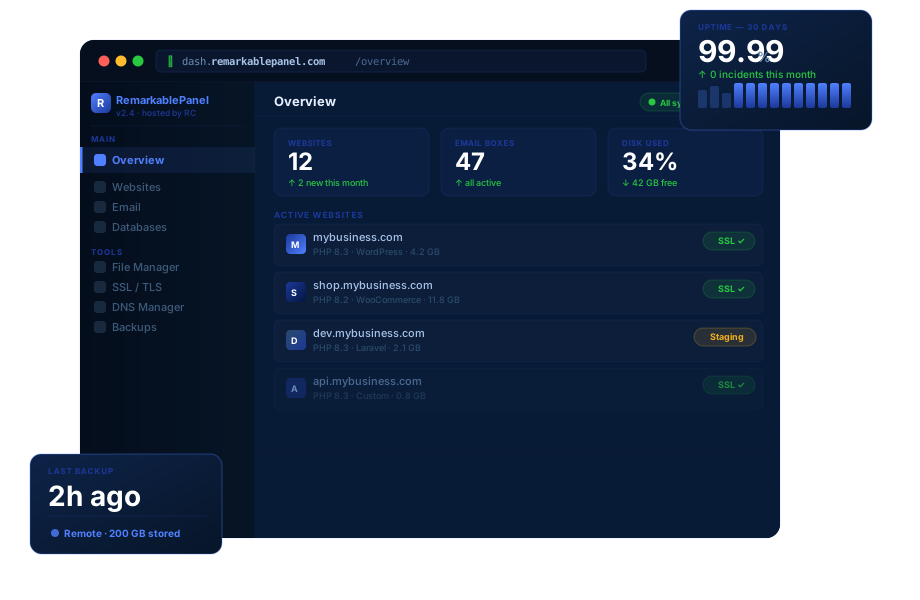
Control panelRemarkablePanel, first license free
MigrationFree, handled by our team
Best forBusy eCommerce, databases, CPU-bound workloads
Pricing
How much does Dedicated CPU VPS hosting cost?
Dedicated CPU Cloud Cubes start at $75/month with annual billing ($90 monthly), going up to $983.33/month for the 128 GiB plan. Every plan is fully managed with everything included: monitoring, dual offsite backups, mail gateway, free migration, and 500% SLA. No setup fees, no contracts, cancel anytime.
Dual offsite backups (PBS + S3) and daily snapshots included with every plan. No extra cost.
Annual billing gets you 2 months free per year (16.67% off the monthly rate). Software licenses (cPanel, LiteSpeed, Imunify360) are billed at full price and are not discounted by billing cycle.
Match your workload to the CPU model
When does a workload actually need dedicated cores?
Dedicated CPU Cloud Cubes work best when sustained CPU load, p99 latency stability, or compliance isolation matters. Below are the four most common workloads where reserved cores actually pay off. If your situation matches one of these, Dedicated CPU is likely the right family.
Best Dedicated CPU VPS for high-volume e-commerce
You run WooCommerce, Magento, or PrestaShop at 50+ orders per day with sustained concurrent shoppers. Checkout is CPU-intensive and shared scheduling lets p99 latency spike at the worst possible moment, when payment confirmation hangs.
Reserved cores keep checkout latency flat under load
No noisy-neighbor pauses during payment processing
Predictable response times during traffic spikes
OPcache and Redis tuned for high throughput
Recommended size: DC-16GB or DC-32GB
Best Dedicated CPU VPS for write-heavy databases
You run OLTP workloads (financial transactions, ticketing, inventory, real-time analytics) where every write needs to land predictably. Shared scheduling causes commit times to vary in ways that break SLAs and frustrate customers.
Predictable commit latency under sustained writes
InnoDB or Postgres WAL tuned for throughput
No CPU pauses during transaction commit
Dedicated I/O queue plus dedicated CPU
Recommended size: DC-32GB or DC-64GB
Best Dedicated CPU VPS for ML inference and data processing
You run CPU-based ML inference, ETL pipelines, video transcoding, or scheduled batch jobs that hold cores at 100% for minutes or hours. Shared scheduling will throttle these workloads and you will pay for compute you never get.
Sustained 100% CPU usage without throttling
Predictable job completion times
No burst-credit exhaustion mid-job
Reserved cores deliver every cycle you pay for
Recommended size: DC-32GB or DC-64GB
Best Dedicated CPU VPS for regulated and compliance workloads
You handle PCI-scoped data, HIPAA-adjacent workflows, or operate under contractual obligations that prohibit shared CPU scheduling. Compliance auditors increasingly flag oversubscription as a risk surface, and dedicated cores remove that surface entirely.
No shared CPU scheduling across tenants
Deterministic compute isolation for audits
Auditable management procedures and logs
Hardened firewall and IDS by default
Recommended size: DC-16GB or DC-32GB
Not sure which size fits? Tell us about your workload (CPU patterns, sustained load, compliance requirements) and we will recommend a plan based on actual usage patterns, not guesswork.
Picking the right family
When should I pick Dedicated CPU instead of Shared CPU?
Dedicated CPU sits at the top of the Cloud Cubes lineup for a reason: it gives you reserved cores with no oversubscription, the same fully managed stack as every plan, and one reserved core per 8 GiB of RAM, sized for compute-heavy workloads. Here is what that means in practice, and where Dedicated CPU genuinely fits versus Shared CPU.
What Dedicated CPU gives you that Shared CPU cannot
Shared CPU Cloud Cubes work for the vast majority of managed VPS workloads because typical web traffic is bursty. PHP requests come in waves, databases idle between queries, queues drain in spurts. Shared scheduling is efficient for that pattern, and it buys you more scheduled vCPUs for the same money.
Dedicated CPU Cloud Cubes give you reserved +3.00 GHz cores with no oversubscription. Your cores are not scheduled across other tenants. There is no burst credit to exhaust, no noisy neighbor to throttle around, no scheduler pause when the host hypervisor gets busy. Your workload runs at full speed, every cycle, all the time. That predictability is what changes when you cross from "bursty web app" into "sustained CPU workload" or "compliance-mandated isolation."
The operations stack is identical across both families: 24/7 monitoring, security patching, dual offsite backups, mail gateway, free migration, RemarkablePanel for control, everything included in the price. The CPU model is the only thing that changes between Shared and Dedicated, and that single change is why p99 latency stays flat under load instead of spiking when neighbors get noisy.
100%
Reserved Cores
No oversubscription. No bursting. Your cores run your workload, period.
1:8
Core-to-RAM Ratio
8 GiB of RAM per reserved +3.00 GHz core, uniform across all six plans.
128 GiB
Top-end RAM
Scale to 128 GiB with 16 reserved cores. Twice the ceiling of Shared CPU.
500%
Uptime SLA
5x downtime credited back, not the 1x most hosts offer.
When Dedicated CPU is the right call
Dedicated CPU is the right family when sustained CPU pressure, predictable p99 latency, or compliance isolation are the binding constraints, not just total RAM or storage.
Your workload is CPU-bound: write-heavy OLTP databases, ML inference, video transcoding, ETL pipelines, scheduled batch jobs that hold cores at 100% for minutes or hours.
You need predictable p99 latency under sustained load. Shared scheduling causes tail latency to vary in ways that break SLAs, frustrate customers, and complicate capacity planning.
You run regulated workloads: PCI-scoped data, HIPAA-adjacent workflows, contracted SOC 2 environments, or anything where shared CPU scheduling is unacceptable for compliance reasons.
You need 64+ GiB RAM with reserved cores. Dedicated CPU goes to 128 GiB with 16 reserved cores, the largest single-server option in the Cloud Cubes lineup.
You outgrew Shared CPU because your workload became compute-bound, not just memory-bound. CPU usage above 70% sustained is the upgrade trigger.
Dedicated CPU is the right call when "predictable" is worth more than maximum cores per dollar.
When Shared CPU is the better fit
The wrong family hurts you twice: you pay for performance characteristics you never use, and you do not get the resource shape your workload actually needs. Be honest about your bottleneck.
Your workload is bursty, not sustained. Typical WordPress, SaaS web tiers, brochure sites, and most CMS workloads spend more time idle than at load. Shared scheduling matches that pattern; Shared CPU Cloud Cubes are built for it.
Your bottleneck is RAM and concurrency, not sustained compute. Memory-hungry CMS, multi-database stacks, and large object caches want vCPU count and memory headroom. At 16 GiB, Shared CPU gives you six scheduled vCPUs for $121.67/month annual versus two dedicated cores for $135.
Your traffic is small. Under 50,000 monthly visits with CPU usage under 30%, reserved cores buy nothing you can measure. Shared CPU starts at $20/month annual and handles this comfortably.
Budget-per-core is the binding constraint. Dedicated plans give you fewer, exclusive cores for the money. If your workload runs fine on shared scheduling, the exclusivity premium delivers no measurable difference.
We tell you this because we would rather you land on the correct family from day one. Tell us your workload and we will recommend a plan.
Choosing the right size
How many reserved cores does your workload need?
Dedicated CPU Cloud Cubes scale one reserved +3.00 GHz core per 8 GiB of RAM, so sizing by cores and sizing by memory are the same decision. One core runs a single sustained workload, 2 to 4 cores cover most production eCommerce and databases, and 6 or more is consolidation and heavy compute territory. Every size is fully managed with everything included, and resizing later is a managed operation. If your CPU demand is bursty rather than sustained, start with Shared CPU Cloud Cubes instead.
DC-8GB
From $75/mo · 1 core · 8 GiB
Start here if
You run one sustained workload: a single busy store, one production database, or one CPU-steady application.
You need guaranteed cycles for a latency-sensitive app that shared scheduling keeps disappointing.
You have a small compliance workload that must run on cores no other tenant can touch.
You want the dedicated entry point: same management, backups, and SLA as every larger plan.
Still unsure? Tell us about your workload (CPU patterns, sustained load, compliance needs, database size) and we will recommend a size based on real usage patterns instead of guessing. Resizing later is a fast, managed operation, so there is no penalty for starting small.
The boundary
What does "fully managed" actually mean?
"Managed hosting" is overused. Some hosts call themselves managed and still leave OS patches, mail config, and security alerts on your plate. Here is exactly what we handle, what stays under your control, and where the line is. No ambiguity.
What we handle so you don't have to
Server administration, security, monitoring, and operations are our job, included in your plan.
24/7 server monitoring for CPU, RAM, disk, network, and services
This is what "managed" should mean. Compare it to providers who call themselves "managed" while leaving security patches as your job. Those are not actually managed.
Included free with every Cube
Why does my VPS run a control panel, DNS, and backups?
On most managed VPS hosts, your server runs the control panel, DNS server, and backup engine alongside your actual workload, eating CPU, RAM, and disk before you host a single site. RemarkablePanel moves all three to our shared infrastructure at no charge. Your VPS runs only what matters: web, mail, and databases.
Traditional VPS
Control panel~512 MB RAM
DNS server~128 MB RAM
Backup enginedisk + CPU spikes
Web serveryour workload
Databaseyour workload
Emailyour workload
Your Cloud Cube
Control panelRC
DNS serverRC
Backup engineRC
Web server100% yours
Database100% yours
Email100% yours
First user is free, included with every Cloud Cube. Pay $0.15/month per additional user as you grow. No fixed license fees, no surprise charges, no per-server costs. Compare to cPanel ($15-45/mo flat) or Plesk ($10-35/mo flat) on most other hosts.
Frees CPU and RAM on your VPS
Sell shared, reseller, and VPS from one panel
Multi-tier resellers supported
White-label with your own domain
Multi-server cluster ready
Full support for you and your clients
The web UI, account database, billing integration, and admin services all run on our shared cluster. You get a full-featured panel without it consuming a single MB of your VPS RAM or a single percent of your CPU. cPanel-style power without the cPanel-style overhead.
~512 MB freed on your VPS
DNS hosted globally redundant
Authoritative DNS for every domain on your account runs on our geographically distributed name servers. Faster lookups for visitors worldwide, automatic failover if a region goes down, no DNS daemon eating memory on your server, and no DNS hijacking risk if your VPS is ever compromised.
Faster DNS, zero VPS load
Backup engine, off your server
Daily snapshots and off-site backups run on dedicated backup hardware, not your VPS. No CPU spikes during backup windows, no disk I/O contention slowing your site, and no backup-induced load average alerts at 3am. Restores happen the same way: from our infrastructure, not yours.
Zero performance impact
The category question
Managed VPS vs shared hosting vs unmanaged cloud, which is right?
Before choosing a tier, choose a category. These three hosting types are not really competitors, they solve different problems for different buyers. Pick the wrong category and tier choice will not save you.
Feature
Shared Hosting
Managed VPS Cloud Cubes
Unmanaged Cloud DigitalOcean / Linode / Vultr
Resources
Shared with hundreds of others
100% allocated to you
100% allocated to you
Server administration
Provider-managed
Provider-managed
Your responsibility
Security patching
Provider
Provider
Your responsibility
Monitoring and alerts
Basic uptime only
24/7 proactive
DIY (you set it up)
Performance under load
Throttled at peak
Consistent
Consistent (if you tune it)
Custom software
Limited
Most stacks supported
Anything (you install it)
Root access
No
Available on request
Yes (default)
Mail gateway and antispam
Basic, shared
Rspamd, dedicated
You configure it
Migration help
Rarely free
Free, full handoff
Not included
Best for
Personal blogs, simple sites
Agencies, eCommerce, SaaS, growing businesses
Teams with DevOps capacity
Typical cost
$3 to $15/month
From $8/mo (Basic, annual)
$5 to $20/month + your time
Choose shared hosting if
You have one small site, low traffic, zero technical needs.
A personal blog, a brochure site, a hobby project. Most CloudCubes customers came from shared hosting after outgrowing it. If your site is still small and growing slowly, shared hosting is a fine starting point.
Choose managed VPS if
You need real resources without becoming a sysadmin.
This is where most growing businesses land. Dedicated RAM, dedicated storage, predictable performance, full operations included. The right answer for agencies, eCommerce stores, SaaS in early traction, and serious WordPress workloads.
Choose unmanaged cloud if
You have an in-house DevOps engineer or you ARE the DevOps engineer.
DigitalOcean, Linode, and Vultr are excellent if you have the operations capacity to run them. The dollar savings vs managed are real, but the time cost is real too. Make sure that math works for you before signing up.
Pricing transparency
Why does dedicated VPS pricing vary so much?
The honest answer: most price differences come down to what is actually included. An unmanaged dedicated-core instance and a fully managed Dedicated CPU Cloud Cube with the same cores and RAM are not the same product, and comparing sticker prices is misleading. Here is what each price tag actually covers, with no asterisks.
What our pricing includes
Listed price is the total. Every Cloud Cube is fully managed with everything included: no upgrades to read your email, no fee to talk to a human, no surprises on month two.
100% server management: monitoring, patching, tuning, incident response
Reserved cores: no oversubscription, no noisy neighbors
Daily snapshots: 7-day retention, instant restore on request
Dual offsite backups: PBS + S3, both included on every plan
Mail gateway: MailChannels inbound and outbound antispam
DDoS protection: 50 Gbps, automatic mitigation
Managed firewall and IDS: active threat monitoring
Free migration: from your current host, handled by our team
RemarkablePanel: first license free with every plan
Centralized log analysis: included on every server
500% SLA: 5x downtime credit if we fail
24/7 human support: real engineers, no chatbots
What costs extra at unmanaged hosts
DigitalOcean, Linode, and Vultr advertise low sticker prices for dedicated-core instances with the same cores and RAM. By the time you have a real production setup, that number is much higher.
Backup service: typically 20% of server cost as an add-on
Monitoring: bring your own (Datadog, New Relic) or free tier with limits
Managed database: separate paid service, often 2x the instance cost
Load balancer: paid add-on at $10 to $25/month
Object storage: paid by GB stored and bandwidth used
Premium support: $100-$500+/month for human response on dedicated tiers
Security configuration: your time (or your DevOps engineer's time)
OS patching and tuning: your time, your responsibility
Migration help: usually not offered, you do it yourself
Compliance documentation: not provided, you build it
Mail handling: not included, configure your own
What costs extra on our pricing
Honest disclosure: a few things are not in the base price. Most customers never need them, but you should know what they are before you order.
Software licenses: cPanel, LiteSpeed, Imunify360, Plesk, JetBackup, billed at provider's published rates with no markup
Additional dedicated IPv4 addresses: $2/month per IP, IPv6 is unlimited and free
Custom OS images: standard distros are free, custom builds are quoted
Additional backup retention: extra retention beyond the included 7 days, billed by storage
The honest comparison is not our sticker price against an unmanaged sticker price. It is "DC-32GB at $256.67/month with all operations and compliance-friendly management included" versus "an unmanaged dedicated-core instance with the same specs plus $100 to $500/month in management add-ons, or your own DevOps engineer's time." When you do the actual math at this level, managed wins for any team without a full-time sysadmin already on payroll.
The RC difference
What makes RemarkableCloud different?
Every plan ships with the full stack. No tiers, no add-ons required, no surprise charges. Twelve operational features that most hosts charge extra for, all included in your base price.
Every plan, every tier, no exceptions
100% Fully Managed
Server administration, security hardening, OS patches, performance tuning, incident response. Real engineers since 2001, not chatbots, not outsourced ticket farms.
25 years of operations
Proactive 24/7 Monitoring
We watch CPU, RAM, disk, network, and service-level signals around the clock. If something breaks, we act before you notice. No support ticket required.
Acted on, not just measured
Daily Snapshots
Automatic block-level snapshots taken every 24 hours, retained 7 days. Restore to any point in the last week on request, no extra charge.
7-day retention, instant restore
DDoS Protection
Network-edge mitigation up to 50 Gbps included. Automatic null-routing for sustained attacks. No additional fees, no scrubbing center surprises.
50 Gbps, automatic
Inbound and Outbound Antispam
Dedicated Rspamd-based mail gateway filters incoming spam before it hits your server, and protects your sender reputation on outbound. Almost no other VPS host bundles this.
Rspamd cluster, included
Remote Backups
Off-site replication runs nightly to dedicated backup hardware. Zero impact on your Cube's CPU or disk I/O, and your data survives even if the server room burns down.
Off-site, dedicated infrastructure
Free S3 Backup Storage
Every plan includes off-site S3 storage at 2x your disk size, no extra charge. Use it for backup archives, large transfer staging, or external app data.
2x disk size, no add-on fee
Centralized Log Analysis
All system, web, mail, and security logs aggregated and analyzed automatically. Anomalies trigger alerts, our team investigates, you stay informed.
Aggregated, monitored, escalated
500% SLA Guarantee
We promise 99.99% uptime with a 5x credit if we miss it, not the standard 1x credit other hosts offer. One hour down equals five hours credited back, automatically.
5x downtime credit, automatic
Managed Firewall and IDS
Network-level firewall rules, intrusion detection, fail2ban, and SSH lockdown configured by us, maintained by us. You do not write iptables, ever.
Hardened by default, tuned by us
Free Control Panel
RemarkablePanel included on every plan, runs on shared infrastructure so it does not eat your Cube's resources. cPanel, DirectAdmin, and Plesk available with their own licenses.
RemarkablePanel, free
Free Server Migration
Switching feels like work. We do the work. Our team migrates your sites, databases, mail, DNS, and SSL certificates, plans your cutover, and handles the dirty parts. White-glove, included.
Free, white-glove, included
Verified reviews
Don't take our word for it.
Real feedback from real businesses. Independently verified on Google and Trustpilot, no edits, no cherry-picking.
★★★★★
After encountering numerous issues with my WordPress site while using other providers, a friend recommended RemarkableCloud to me. It's been two years since I made the switch, and I can confidently say I've never looked back. The server is not only fast but also incredibly stable. I haven't experienced any downtime in almost two years. The support team is impressively fast and knowledgeable, always ready to assist.
Keith Harris
Trustpilot
★★★★★
These people deserve nothing less than a 10/10. They're truly masters in the cloud field.
Sebastian Betancur
Google
★★★★★
The tech support is excellent, and they offer very competitive pricing. They also migrated my cPanel VPS to a DirectAdmin VPS without noticeable downtime.
Carlos Reyes
Trustpilot
★★★★★
Problem resolution in no more than half an hour for simple issues, and within 4 hours for complex ones. Great service.
Mauricio Arizaga
Google
★★★★★
Excellent web hosting company. I really love all their products and services. Thank you so much.
Fernando Garibay
Trustpilot
★★★★★
Very professional. Fast, friendly, and consistent. Keep it up.
Daniel Rodriguez
Trustpilot
★★★★★
It's been a month since I signed up with RemarkableCloud.com to test their services and technical support. So far everything has been good. I'm happy with the service.
Wilton
Trustpilot
Our guarantee
What happens if my managed VPS goes down?
Most hosting SLAs only kick in after uptime drops below 99% or 99.9%, which is 7 to 87 hours of downtime per month before you see anything back. Ours starts from minute one, applied automatically, with no ticket required.
1hour down
=
5hours credited back
From minute one
Credits start accumulating from the first minute of downtime. No minimum threshold, no waiting room, no fine print clauses about "scheduled maintenance" or "force majeure."
No ticket required
Credits are applied automatically to your next invoice. You do not need to open a support ticket, submit a claim form, or argue with billing about whether the downtime really happened.
500% not 99.9%
While other hosts calculate fractions of a percent, we guarantee 5x compensation in service credit. It is not a marketing claim. It is written into the contract you sign when you order.
Typical hosting SLA
Credits only trigger after uptime drops below 99% or 99.9%. That is 7 to 87 hours of downtime per month before you see anything back, and the credit is usually 1x the lost time.
RemarkableCloud SLA
Credits from minute one. Five hours back for every hour down. Applied automatically, every time, with no action from you.
Predictable performance under sustained load. Dedicated CPU Cloud Cubes start at $75/month with annual billing ($90 monthly). Every plan is fully managed with everything included: monitoring, dual offsite backups, mail gateway, firewall, and 24/7 human support. No add-ons, no tiers, one price.
30-day money backNo contracts, cancel anytimeFree migration from any hostSince 2001, still here
No setup fees. No surprise charges. The price you see is the price you pay.
FAQ
Common questions about Dedicated CPU VPS hosting
Honest answers about Dedicated CPU Cloud Cubes specifically. If your question is not here, send it to us, we will answer it personally and add it to this list.
What does "Dedicated CPU" actually mean?
Dedicated CPU means your virtual cores are reserved exclusively for your VM, with no scheduling shared across tenants on the underlying physical hardware. There is no oversubscription, no burst credits to exhaust, no scheduler pause when neighbor VMs get busy. Your cores run your workload at full speed every cycle.
This is different from "shared CPU" or "shared vCPU" plans (DigitalOcean droplets, Linode shared instances, our own Shared CPU Cloud Cubes) where the physical cores are scheduled across multiple VMs. For most web workloads shared scheduling is fine because traffic is bursty. For sustained CPU load, compliance environments, and predictable p99 latency, dedicated cores are required.
When does a workload actually need dedicated cores?
The most common signs: sustained CPU usage above 70-80%, p99 response times spiking under load while p50 stays flat, scheduled jobs taking longer than expected during peak hours, write-heavy OLTP databases where commit latency varies in ways that break SLAs, or CPU-intensive workloads (ML inference, video transcoding, ETL pipelines, batch processing) that hold cores at 100% for minutes or hours.
Compliance is the other major trigger: PCI-scoped data, HIPAA-adjacent workflows, contracted SOC 2 environments, or any obligation that prohibits shared CPU scheduling. Auditors increasingly flag oversubscription as a risk surface, and dedicated cores remove that surface entirely.
How is Dedicated CPU different from Shared CPU Cloud Cubes?
The CPU model is the only thing that changes. Shared CPU schedules virtual cores across multiple tenants. Dedicated CPU reserves cores exclusively for your VM. Memory, storage, network, and the entire operations stack are identical between the two families, and both are fully managed with everything included.
The other practical difference is sizing. Shared CPU runs from 1 to 64 GiB RAM with vCPU counts that scale with plan size. Dedicated CPU runs from 8 to 128 GiB with exactly one reserved +3.00 GHz core per 8 GiB. At the same RAM, Dedicated gives you fewer cores for slightly more money (two dedicated cores at $135/month versus six shared vCPUs at $121.67 at 16 GiB), which is the price of guaranteed cycles.
Will my workload throttle on a Dedicated CPU VPS?
No. Dedicated CPU plans have no oversubscription, no burst credits, and no scheduler-induced throttling. You can sustain 100% CPU usage on every reserved core for as long as your workload requires, without performance degradation. This is the entire point of the family.
The only thing that can throttle a workload here is the workload itself: poorly tuned application code, lock contention in databases, or single-threaded bottlenecks that cannot use additional cores. Those are application-level issues, not infrastructure issues, and we help diagnose them when they show up in monitoring.
Are Dedicated CPU VPS plans suitable for compliance workloads?
Yes, with caveats. The CPU isolation that compliance frameworks (PCI DSS, HIPAA, SOC 2) often require is fully met by Dedicated CPU plans. Reserved cores remove the shared-scheduling risk surface that auditors flag at most cloud hosts.
That said, compliance is a holistic process, not a single checkbox. We provide the infrastructure controls (dedicated cores, hardened firewall, IDS, audit logs, encrypted backups) and procedural support (incident response, change management, documented patching cadence) that an auditor will check. We are happy to discuss your specific compliance scope before you order, so reach out if you have a regulated workload.
Can I run write-heavy databases on Dedicated CPU?
Yes, this is one of the primary use cases. OLTP workloads (financial transactions, ticketing, inventory, real-time analytics) need predictable commit latency. Shared scheduling causes commit times to vary in ways that break SLAs. Dedicated cores keep commit latency flat under sustained writes.
For typical OLTP sizing: DC-32GB or DC-64GB handles MySQL or Postgres workloads with millions of rows and hundreds of concurrent writes per second comfortably. We tune InnoDB or Postgres WAL for throughput, configure replication if needed, and keep an eye on long-running queries through our monitoring stack.
Should I downgrade to Shared CPU if my CPU usage is low?
Probably yes. If your CPU usage stays consistently under 30% and you are not on Dedicated for compliance reasons, you are paying for exclusivity you are not using. Shared CPU Cloud Cubes deliver the same management with more scheduled vCPUs for slightly less money, and shared scheduling will not affect your workload at that utilization level.
The downgrade is a simple server move, free of charge, scheduled at a time you choose. We monitor your CPU patterns and will proactively suggest a downgrade if we see you are consistently under-utilizing reserved cores. We would rather you pay for the right plan than the bigger plan.
Does Dedicated CPU include backups?
Yes, every Dedicated CPU plan includes daily snapshots with 7-day retention plus dual offsite backups, no extra charge. Snapshots are block-level and fast to restore. Offsite backups run to two independent destinations, PBS and S3, so your data survives even if the server hardware fails.
Because the two offsite copies are independent of each other and of the server itself, there is no single point of failure in the backup chain. Compliance customers can request extended retention beyond the included 7 days, billed by storage.
Can I migrate from another host for free?
Yes. Free migration is included on every Dedicated CPU plan, regardless of where you are coming from (cPanel host, Plesk host, AWS EC2, DigitalOcean Premium AMD, Linode Dedicated, Vultr, anywhere). Our team handles the move: sites, databases, mail accounts, DNS records, SSL certificates, the whole stack.
For Dedicated CPU migrations we plan extra carefully because workloads at this scale are usually production-critical. We do a test migration first, run it under load to verify performance, then schedule the final cutover at a low-traffic window. Most customers experience zero downtime during migration.
What happens if I exceed my plan limits?
We do not throttle, we do not bill you in surprise overage charges, and we do not suspend your service. Instead, we monitor your resource usage and reach out when you are consistently using 80% or more of your allocated RAM, CPU, or disk. We will recommend either an upgrade or a tuning pass to optimize your existing usage.
For network transfer, the included allowance is generous (20 to 320 TB per month depending on plan size) and most workloads never come close. If you do exceed it, we charge a small per-GB fee that we communicate before applying.
Can I upgrade or downgrade my plan later?
Yes, in either direction. Upgrades within the Dedicated CPU family (8GB to 128GB) usually happen with zero downtime: we add the resources to your existing server in place. Downgrades require a brief reboot to apply the new resource limits, scheduled at a time you choose.
Moving between families (Dedicated CPU to Shared CPU, or back) involves a server move, which our team handles for you. There is no fee for upgrades or family changes, you just pay the difference for the new plan.
What is the refund policy?
30-day money-back guarantee on all Dedicated CPU plans. If you sign up and decide we are not the right fit within the first 30 days, we refund your full first payment, no questions asked, no exit fees, no contracts to cancel.
After 30 days, plans are billed monthly or annually depending on your selected cadence. You can cancel anytime through your account dashboard. Annual plans get pro-rated refunds for unused months on cancellation.